
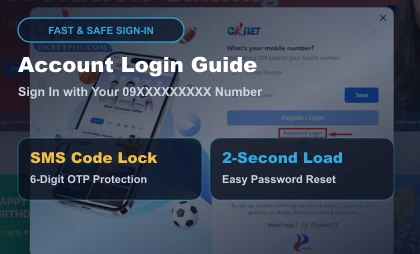
Using the official okgames login page opens your PHP wallet, VIP rewards, and 2,200+ games in under 2 seconds. Protected by our 28ms Taguig server and a 6-digit SMS security code, the sign-in screen works with all 09XXXXXXXXX Philippine mobile numbers and linked e-wallets. Whether you search for ok games log in on your browser or need to fix an okgames gcash login problem, follow our simple steps below.
OKGames Login Guide — Fast Account Sign-In & Password Reset
21+ Safe Gaming • October 2026Official Account Sign-In
✓ Safe TLS Lock| Official Sign-In Page | ok-games.com/login/ (Secure) |
|---|---|
| Mobile Number Format | 11-Digit PH Number (09XXXXXXXXX) |
| SMS Security Check | 6-Digit SMS Code (Good for 90 Seconds) |
| Quick App Unlock | Fingerprint / Face Unlock (v5.5.1 APK) |
| Wrong Password Limit | 5 Tries (15-Min Auto-Pause) |
| Auto Sign-Out Timer | 30 Minutes When Inactive |
| Average Loading Speed | 28ms via Taguig Local Server |
How to Complete Your OKGames Login in 3 Easy Steps
Tap the Login Button
Press the Login button at the top of ok-games.com or open the v5.5.1 mobile app.
Type Your 09XXXXXXXXX Number & Password
Enter your 11-digit Philippine phone number (starting with 09, no spaces) and type your password carefully.
Enter the 6-Digit SMS Code (On New Phones)
If you are signing in on a new phone or cleared browser, type the 6-digit text code sent to your SIM card to open your account.
Account Sign-In & SMS Security Highlights
Sign In with Your 09XXXXXXXXX Number
Log in easily using your registered 11-digit Philippine mobile number or your chosen player username.
Saved GCash & Maya Wallet Link
Once your wallet is linked, you can top up and cash out right after signing in without re-typing your account details.
15-Minute Auto-Lock Against Guessers
Five wrong password tries pause sign-in for 15 minutes and send you a text alert so strangers cannot guess your password.
How OKGames GCash Login & Wallet Linking Work
Many players search for okgames gcash login hoping to sign in using the same mobile number tied to their GCash or Maya wallet. When you sign up on our site with the exact same 09XXXXXXXXX number you use for GCash, your game login and cashier wallet match up smoothly.
After you sign in, open Account Center > Cashier > Deposit and pick your saved GCash number. You will not need to type your phone number every time—just approve the ₱150+ top-up in your GCash app and enjoy 4-minute cashouts.
How to Fix Common OKGames Login Problems & Late SMS Codes
Running into an okgames gcash login problem or waiting for a late text code is usually caused by weak cell signal, a small typing mistake, or an old browser bookmark. Here is how to fix each problem fast:
- 1. Late 6-Digit SMS Code on Smart, Globe, or DITO: Do not tap Resend Code over and over, because each new request cancels the previous text message. Wait the full 90 seconds, turn Airplane Mode on and off to refresh your signal, and check your SMS Spam folder.
- 2. "Wrong Account or Password" Message: Make sure you typed 11 digits starting with 09 (like 0917XXXXXXX) instead of +639, and check if your phone keyboard accidentally capitalized the first letter of your password.
- 3. 15-Minute Pause After 5 Wrong Passwords: You do not have to wait 15 minutes. Tap Forgot Password under the login box, enter the 6-digit SMS code sent to your phone, and pick a new password to unlock your account right away.
- 4. Page Won't Load on Old Bookmark: If an old link fails to open the okgames ph login screen, check our official working links page or use the v5.5.1 Android app.
What to Do If You Lost Your SIM Card or Changed Phone Numbers
If you lost your registered 09XXXXXXXXX SIM card and cannot get a password reset text, please do not make a second account—having two accounts breaks our one-account rule and pauses cashouts. Instead, tap the 24/7 Live Chat button on the login screen to ask for a Phone Number Update.
Our support team will ask for your full real name, birth date (showing you are 21+), and a screenshot of your last GCash or Maya deposit receipt. Once checked, we move your PHP balance and VIP level to your new 11-digit mobile number in about 15 minutes.
Simple Safety Tips If You Share a Phone or Computer at Home
If other adults in your home use the same computer or tablet, keeping your okgames login safe is super important. Never let Chrome or Edge save your password on a shared device, because anyone using that screen could open your account or wallet.
Always tap Account Center > Log Out when you finish playing instead of just closing the tab. Tapping Log Out closes your session right away on our Taguig BGC server so pressing the Back button will not reopen your account.
| Your Own Smartphone (v5.5.1 App) | Use Fingerprint Lock + 30-Min Auto-Logout |
|---|---|
| Your Own Phone Browser | Use Private DNS + Never Share Your 6-Digit OTP |
| Shared Home Tablet or PC | Turn Off Save Password + Always Tap Log Out |
| Public Pisonet or Free Wi-Fi | Avoid Using (Play on Your Own Mobile Data Instead) |
Account & Cashier Shortcuts
Account Sign-In, Password Reset & OTP FAQs
How do I reset my forgotten okgames login password?
Tap Login > Forgot Password, type your registered 09XXXXXXXXX mobile number, and enter the 6-digit SMS code sent to your phone. Pick a new 8–16 character password to sign back in right away.
Why does the site ask for a 6-digit SMS code when my password is right?
Our safety system asks for an SMS code whenever you sign in from a new phone, a cleared browser, or a different Wi-Fi network. Install the v5.5.1 Android app and turn on fingerprint login to skip repeat browser codes.
Can I sign into my account on two phones at the same time?
No, to keep your balance safe, only one phone can stay signed in at a time. Logging in on a second device automatically signs out the first phone so your game bets do not get mixed up.
What should I do if my account asks for an ID check?
Open Account Center > Profile Verification or message 24/7 Live Support with a clear photo of your valid Philippine government ID (PhilSys National ID, Driver's License, Passport, or UMID) showing you are 21+.